
Application comes in
The conversation starts on their WhatsApp.
Catalisa Solution · Recruiting & Hiring
Recruiting conversations on WhatsApp — the messaging app Brazil runs on — with screening, video interviews and written assessments, on top of the ATS your agency already uses.
What we keep hearing
My whole day is rescheduling.
Calendars checked, slots booked on both ends and follow-ups for whoever went quiet — without anyone having to remember.
Everyone promises detailed feedback. Nobody delivers.
Real progress for the client whenever they ask; feedback for the candidate at the end, released by a recruiter before it goes out.
The right tool is the one people already carry in their pocket.
Nobody installs anything: candidates, clients and recruiters stay on the channel they already use every day.
Clients and candidates send voice notes, and nobody can skim a voice note.
Voice notes become text in the same flow, transcribed in Portuguese on our own servers — and count as part of the record.
Who talks to the number


Whoever writes in is identified from your records before any reply goes out.
Where the data lives
It looks things up, moves stages and adds notes in the ATS your agency already uses. In this demo, Recruit CRM.
Candidate types, custom fields and a stage-by-stage pipeline inside Catalisa, with no migration project.
One process, one day
The conversation starts on their WhatsApp.

Benefits and work model come straight from your policy.

Link in the chat, room in the browser.

A draft with evidence and gaps.
Where the team works
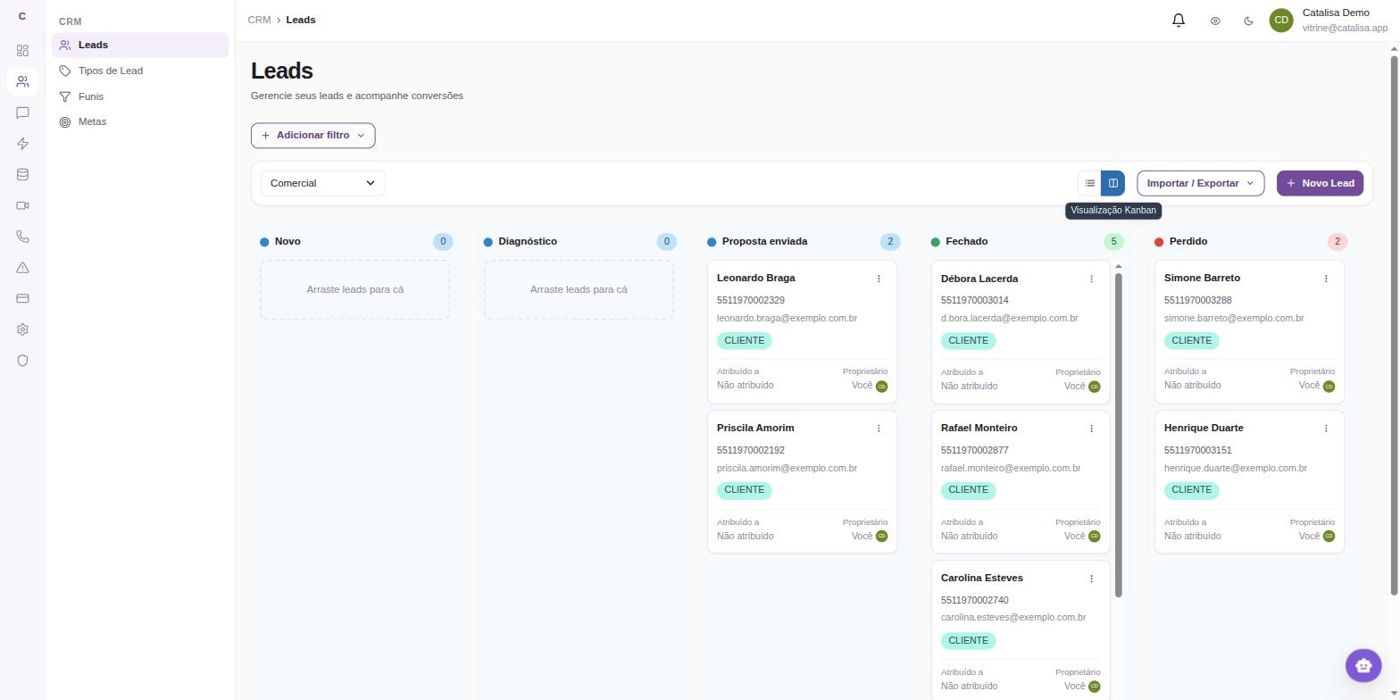
Every application becomes a card in the pipeline, with stage, owner and history.
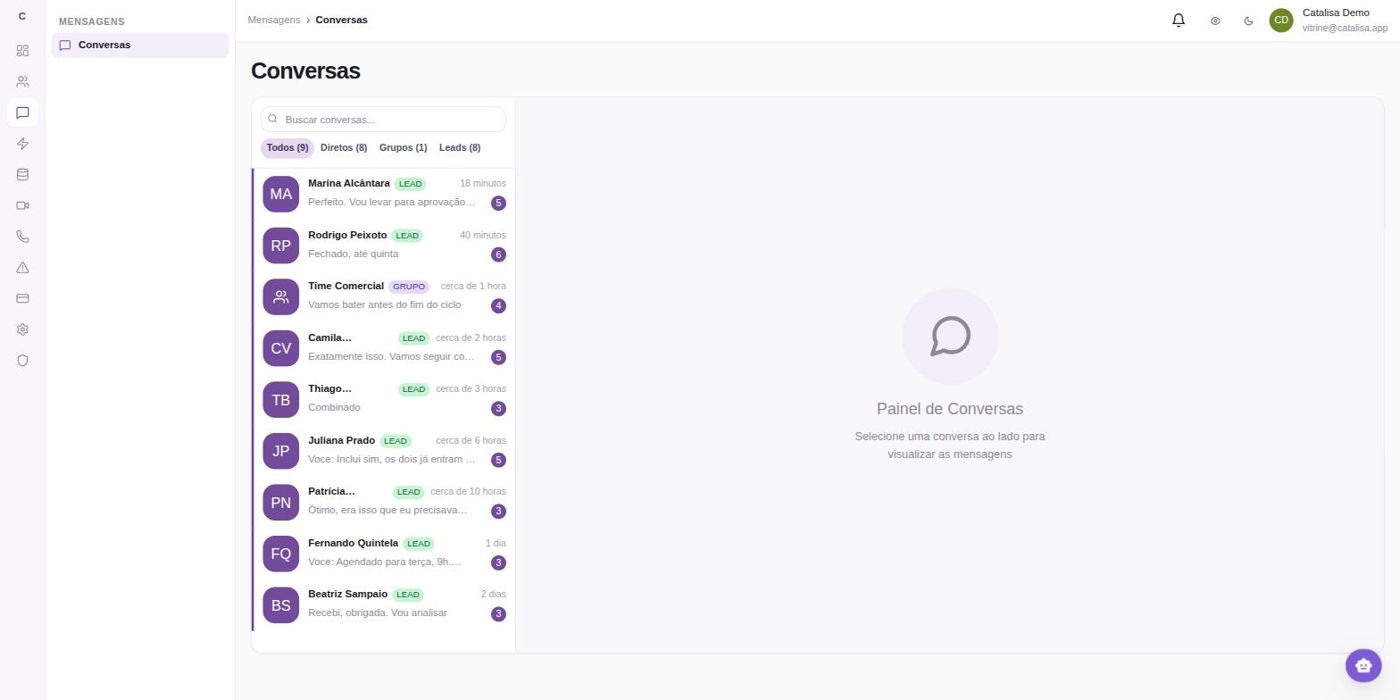
Conversations
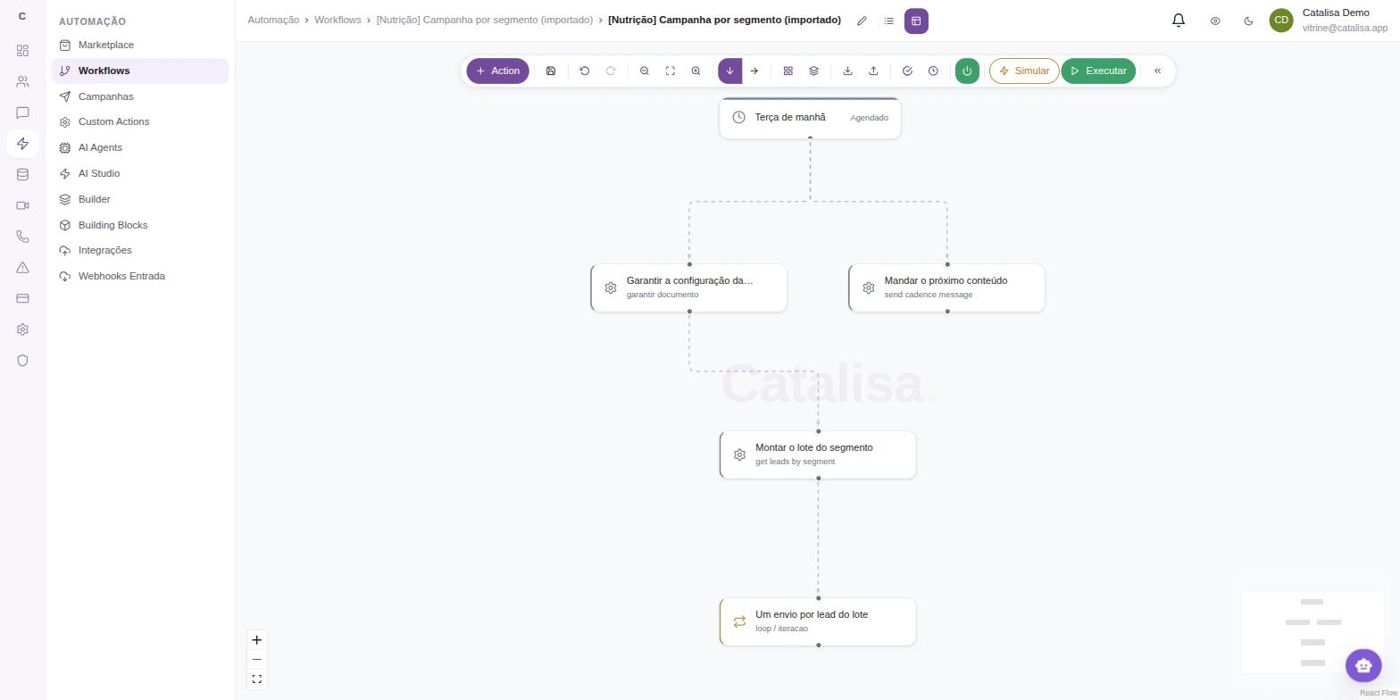
Process workflow
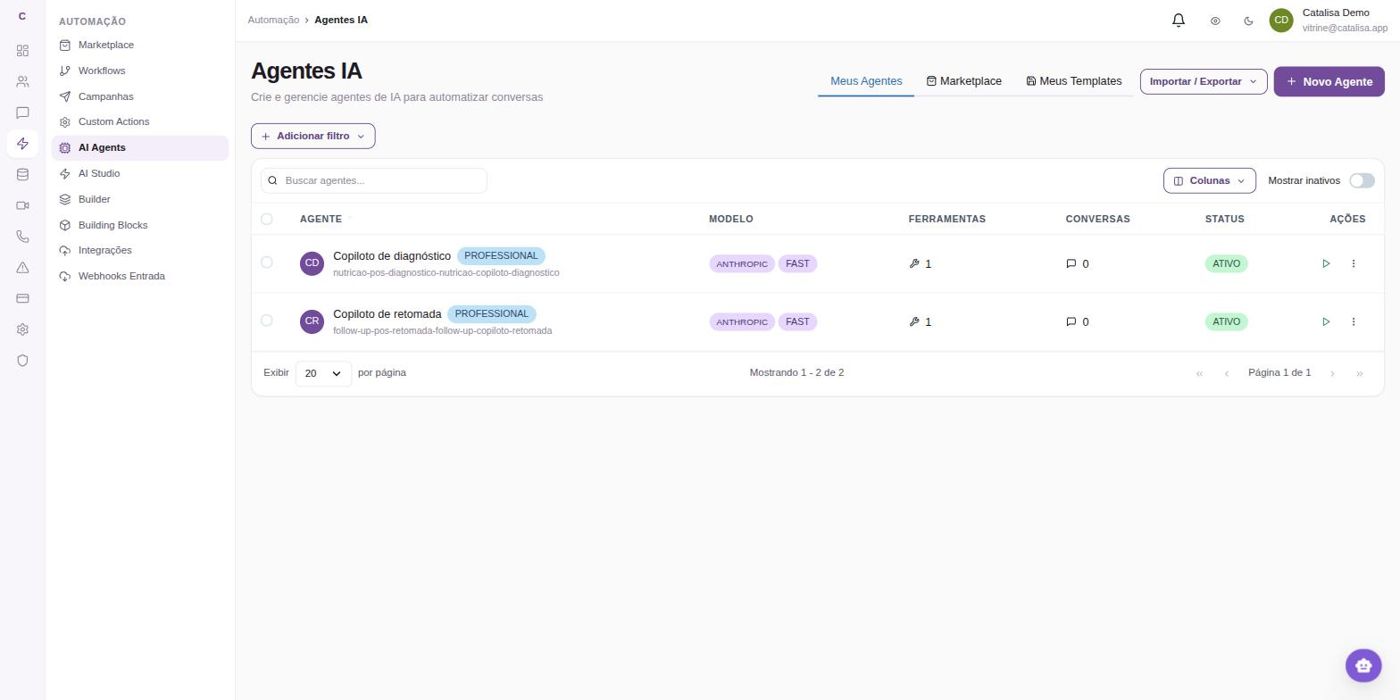
Agents
Piece by piece
WhatsApp replies, answers questions and schedules. No video, no switching systems.
You need: a number and your policy as a PDF.
The room, the transcript, the copilot and the assessment. Screening stays exactly as it is.
You need: nothing but a browser.
The knowledge base answers for you — on WhatsApp, in the interview room, or both.
You need: the documents you already have.
Application, conversation, interview and assessment in a single line — what the demo shows.
You need: the three above, switched on.
Each piece stands on its own. What connects them is configuration, not a prerequisite — switch one on today and the next one next month, without redoing anything.
Flexibility
What you build for recruiting — agents, knowledge base, workflows and the number — isn't locked into recruiting. The pieces are the same, and they plug into the same workflow.
When the candidate accepts, the same workflow sends the document out for signature and notifies both sides. Nobody leaves the conversation to open another system.
Once the role is filled, the workflow bills the client, and the payment reminder goes out from the same number that was already talking to them.
A booked interview lands on the recruiter's calendar; the summary goes by email to whoever wasn't in the room. It's a workflow action, not an integration for someday.
What the conversation logs — candidate moved, interview done, role filled — feeds the team's metrics without anyone filling in a spreadsheet at month-end.
Sales, finance and support use the same pieces with different content. Whoever learned to build the recruiting workflow builds the next one without starting from scratch.
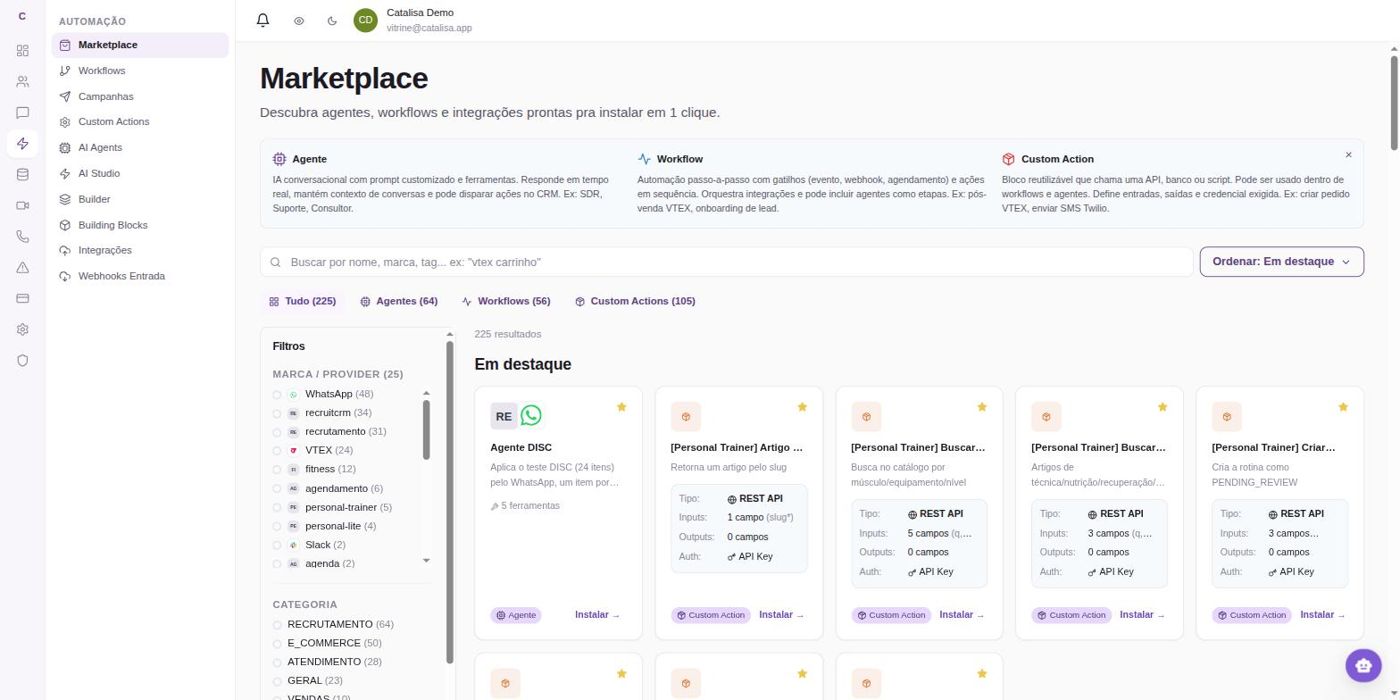
Agents, workflows and actions ready to install in one click.
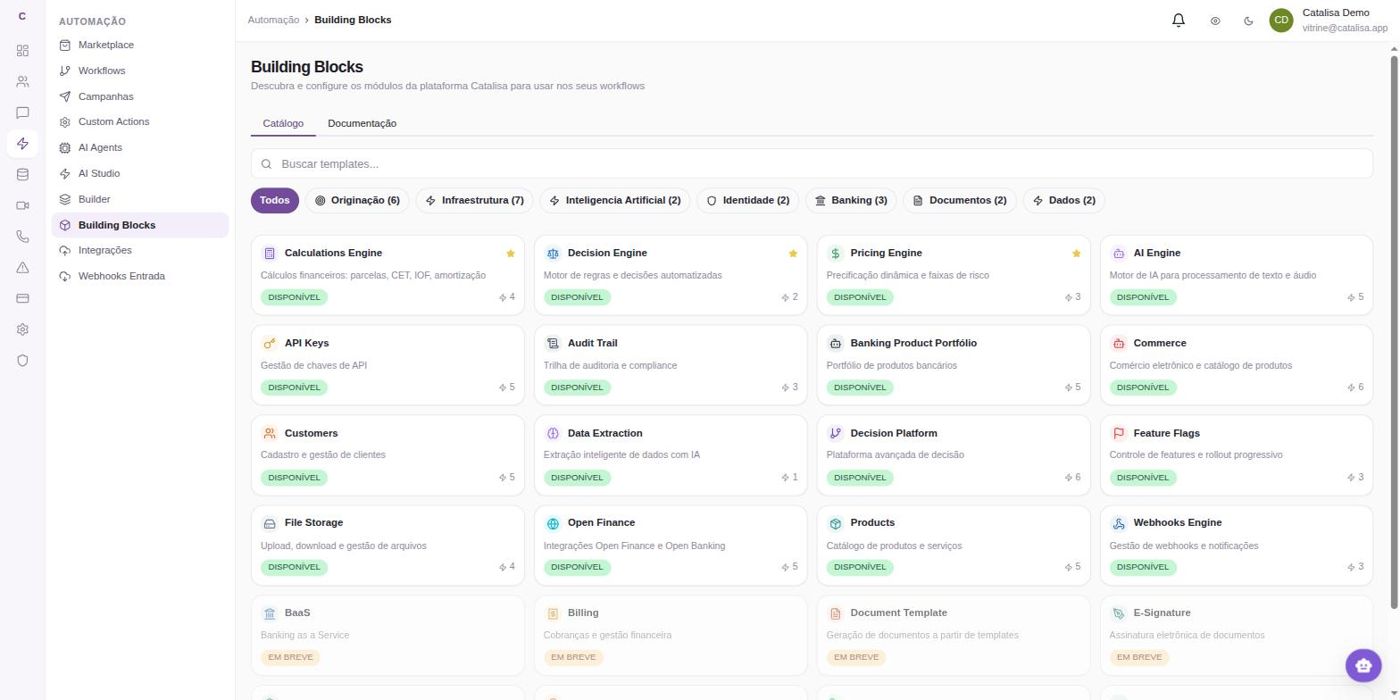
The building blocks any workflow can call — from documents and billing to calendar and email.
None of this is "we could integrate that someday." These pieces already exist in the catalog and plug into the workflow like any other — the work is choosing and configuring, not building.
Open demo
You come in as a candidate. Alongside, the page shows what the recruiter would see at that very moment.
Value creation
Candidates, client companies and recruiters want different things from the same process. Today each one sits at a separate end — and the recruiter pays the price of connecting all three.
Three ends, one line. The product is the line.
What we keep hearing
The conversation checks the recruiter's calendar, books an open slot and confirms with both sides. Whoever didn't reply yesterday gets a nudge today without anyone having to remember, and a summary of what's still open arrives at the start of the workday — not at month-end close.
During the process, the client asks and gets the role's real progress instead of an answer that has gone stale. At the end, the candidate gets feedback on what they demonstrated and what was missing — written from the interview and released by a recruiter before it goes out.
Candidates install nothing, clients learn no new system, and recruiters work from inside the chat itself: move a stage, add a note, request a résumé. When another channel makes sense — email, calendar, Slack — it joins the same workflow, not a separate project.
Here, voice notes become text inside the same workflow, in Portuguese. Transcription runs on our own service, in our own infrastructure — not on a third-party API. What arrived as speech becomes searchable, feeds the assessment and counts as a record just like any written message.
Profile by profile
Profile 01
Sends a résumé and hears nothing back. Finds out they lost the role after the process is already over, without ever learning what was missing — and tells their friends about it.
Gets a reply the minute they apply, asks about benefits and stages without feeling awkward, and books the interview over WhatsApp.
What the agency gains: fewer good candidates dropping out midway, and a reputation that shows up in the next search.
Profile 02
Emails to ask how the role is going, waits for the recruiter to open the system and gets an answer that has already gone stale. Detailed candidate feedback, when it comes at all, comes late.
Asks on the same WhatsApp and gets the role's real progress, the candidate's résumé and the interview assessment, right away.
What the agency gains: it stops being chased for status updates and starts being remembered for results.
Profile 03
Spends the day rescheduling, repeating the same explanation and typing into the ATS what they already discussed. Listens to ten-minute voice notes to find one detail. Makes decisions with whatever is left of the day.
Gets the screening done, the record written and the interview assessment in draft — with evidence and gaps flagged for follow-up.
What the agency gains: recruiter hours go back to judgment calls, which is what the client actually pays for.
Where it shows up on the bottom line
The waiting disappears because the reply no longer depends on someone having a free moment. It's the easiest gain to measure: compare the application date with the first-contact date, before and after.
What was discussed goes straight into the system. The recruiter stops being the courier between the conversation and the records.
People who get answers stay in the process. The role reaches the finish line with more good people still standing — not just the ones who had the patience.
Where to start
Three setup scenarios — not named clients. None of them switches on the whole platform from day one, and none needs to.
Six people, an organized process, a recruiting system nobody wants to replace. They switch on messaging only: the number answers candidates and clients and writes to the current ATS. Video and knowledge can wait.
Screening is the team's pride and nobody is touching it. They switch on interviews only: a room behind a link, a transcript and a written assessment. The win is same-day feedback to the client.
There's no ATS, and switching tools is a project nobody has the energy for. They build the ATS here with types and a pipeline, and switch on messaging on top. Interviews come in once the house is in order.
The reverse works too: switch everything on and turn off what didn't help. Whatever is off asks for nobody's attention.
How it works
For the candidate there's just WhatsApp and a link. Everything else happens before the message arrives.
Why you can trust the conversation
Whoever writes in is identified from your records before any reply goes out. Candidates never get a message meant for the client, and clients never get one meant for the candidate.
Looking things up is open. Changing stages, adding notes and attaching résumés only happens where you allowed it — and it's logged, with date and source, for any later review.
The file is fetched and attached by the system, not retyped by the AI. No half-broken links landing in your client's inbox.
Routine situations — résumé not found, role closed, stage completed — use wording you define. Creativity is saved for what is genuinely conversation.
Job questions, résumé delivery, scheduling and behavioral profiles are each handled by a different specialist. A generic assistant gets it wrong exactly where the process hurts.
If the answer isn't in your policy or your system, the conversation says it will check and hands over to a recruiter with the full history. Making things up is the one mistake that costs you the client.
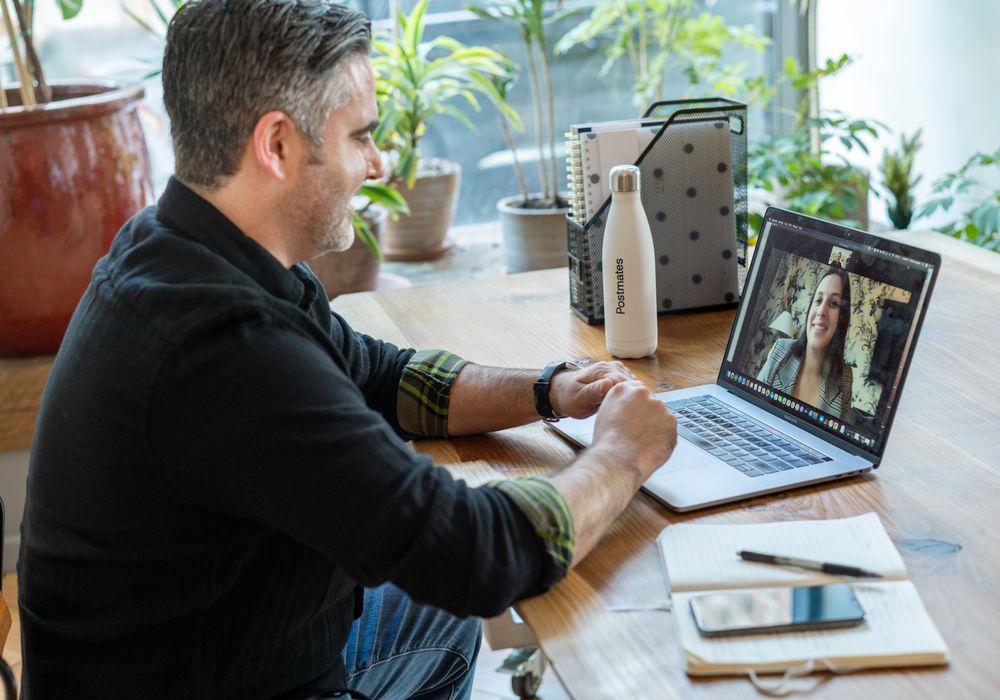
Continuity
What the person shared on WhatsApp reaches the interview, and what they said in the interview reaches the assessment. The recruiter never has to rebuild the history.
Messaging
It isn't a website widget. It's your agency's WhatsApp, in your voice and following your policy.
Behavior
On the other side
Recruiters follow along, take over and reply from inside the dashboard whenever they want to step in.
This piece works on its own. You can switch on messaging alone and leave video interviews and the knowledge base for later — or never.
Interviews
Nothing to install. Speech is transcribed as it happens, and the copilot points out to the recruiter what hasn't been asked yet.
 Ana Paula · candidateMarina · recruiter
She mentioned leading the migration, but didn't say how many people or for how long.
The role calls for dimensional modeling. So far only visualization has come up.
Left unfinished: why she left her previous job.
Transcript saved with the meeting.
Post-interview workflow kicks off on its own.
Assessment starts as a draft.
Approval — nothing goes out on its own.
The copilot belongs to the recruiter
The three kinds of prompts it gives. Only the interviewer sees them — never the candidate.
Sales dashboard in production, used by the sales team without a go-between; migration from a spreadsheet; direct dialogue with the business side.
Dimensional modeling didn't come up. Size of the team she led not stated.
Technical case due Friday; response promised for Monday.
Before the room opens
Everything already on file — role, stage and your agency's custom fields — sits in the room's sidebar, not in a tab someone has to remember to open.
Up to five past conversations with the same person, each with a summary. The second conversation picks up where the first left off, even if it was with another recruiter.
Résumé, job description and policy live in the knowledge base. That's where agents answer from on WhatsApp, and where the post-interview workflow draws context to write the assessment.
The WhatsApp conversation, the profile, the history and the documents arrive together at interview time — and go back together into the workflow that runs when the call ends.
Not just interviews
Role intake, shortlist presentations, process debriefs. Same recording, same transcript and the same record at the end.
This piece works on its own. The room and the assessment pay off even if WhatsApp conversations keep being handled by people, the way they are today.
Your ATS
The conversation needs somewhere to read from and write to. That can be your current recruiting system — or Catalisa itself.
Two paths
The conversation looks up roles and candidates, moves stages, adds notes and attaches résumés inside your ATS, via API. Nobody switches tools and the history stays where it has always been.
In this demo the system is Recruit CRM — the integration built and tested today. Another ATS comes in through the same door: each one is a configuration job, not a magic button, and depends on the API it exposes.
If the agency still runs on spreadsheets, or wants to leave its current ATS: candidate types with custom fields, a stage-by-stage pipeline, conversation history and a knowledge base — in the same place the conversations already happen.
No migration project to get started: you can start here and, if an ATS ever comes along, connect it later.
Path 2, on screen
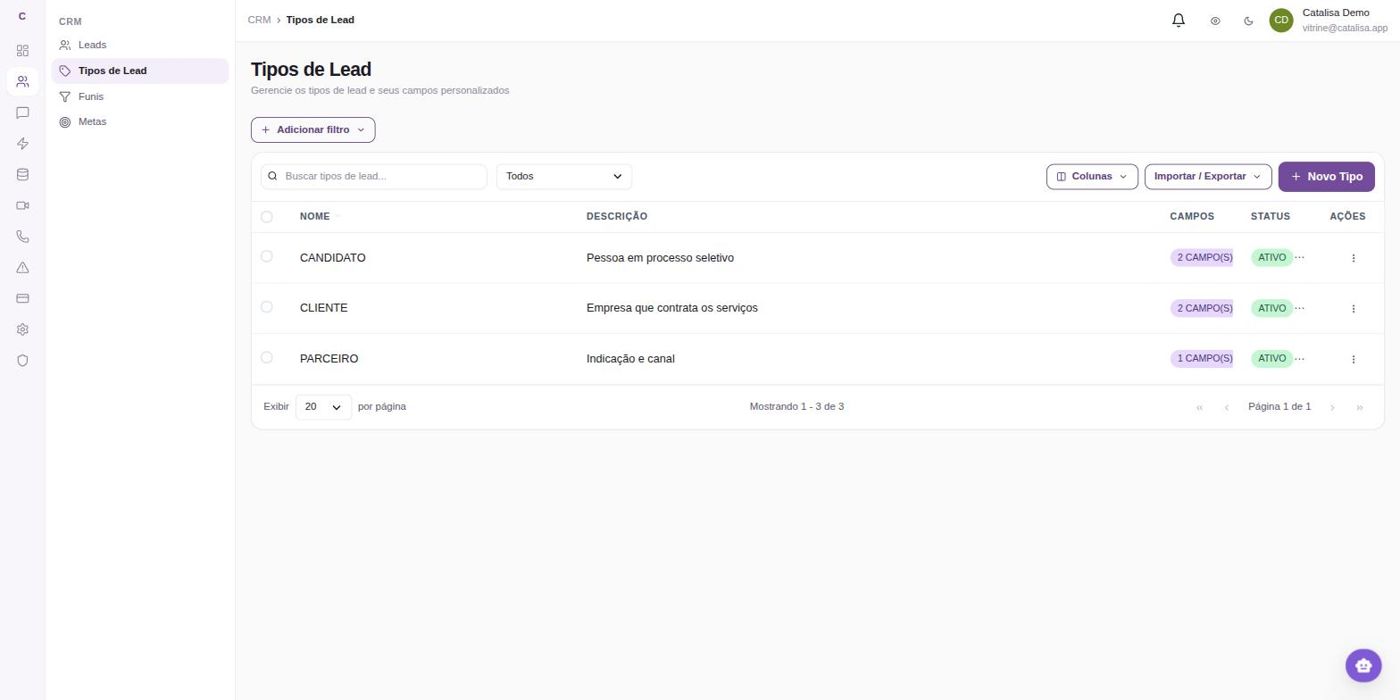
A candidate type with the fields your role requires.
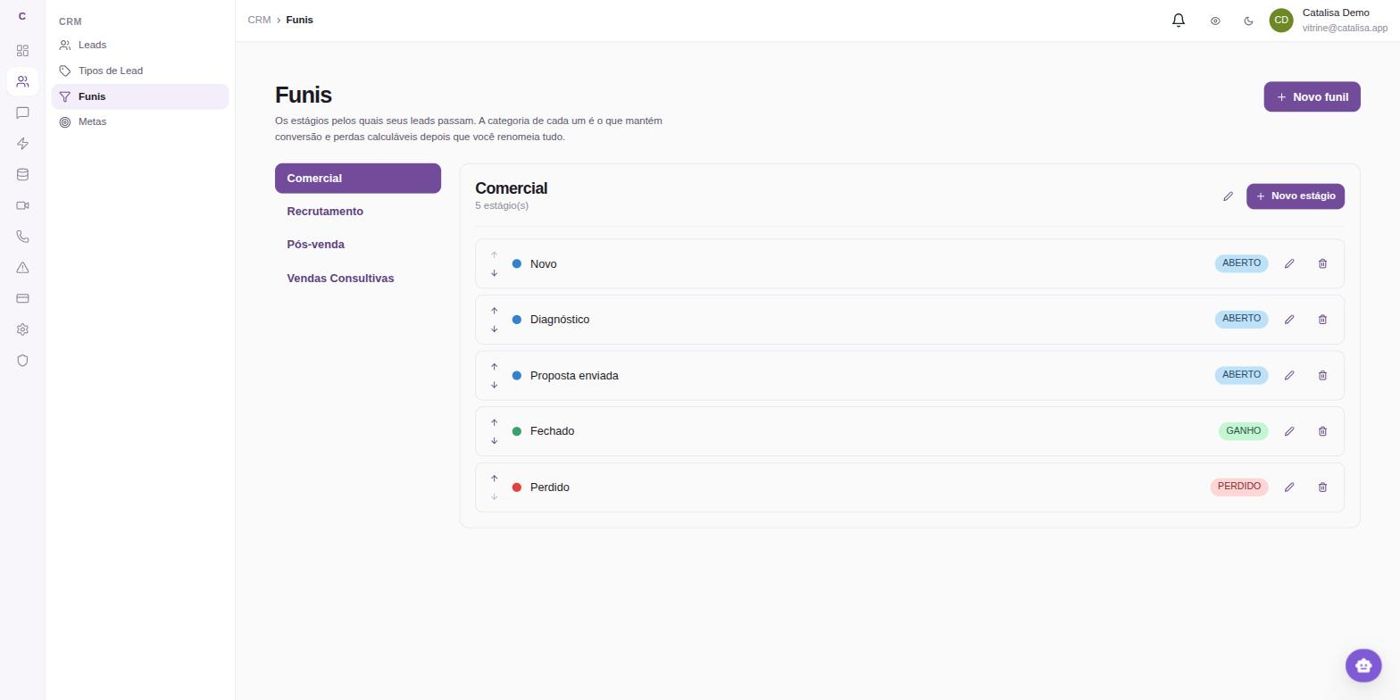
A stage-by-stage pipeline, with open, won and lost categories.
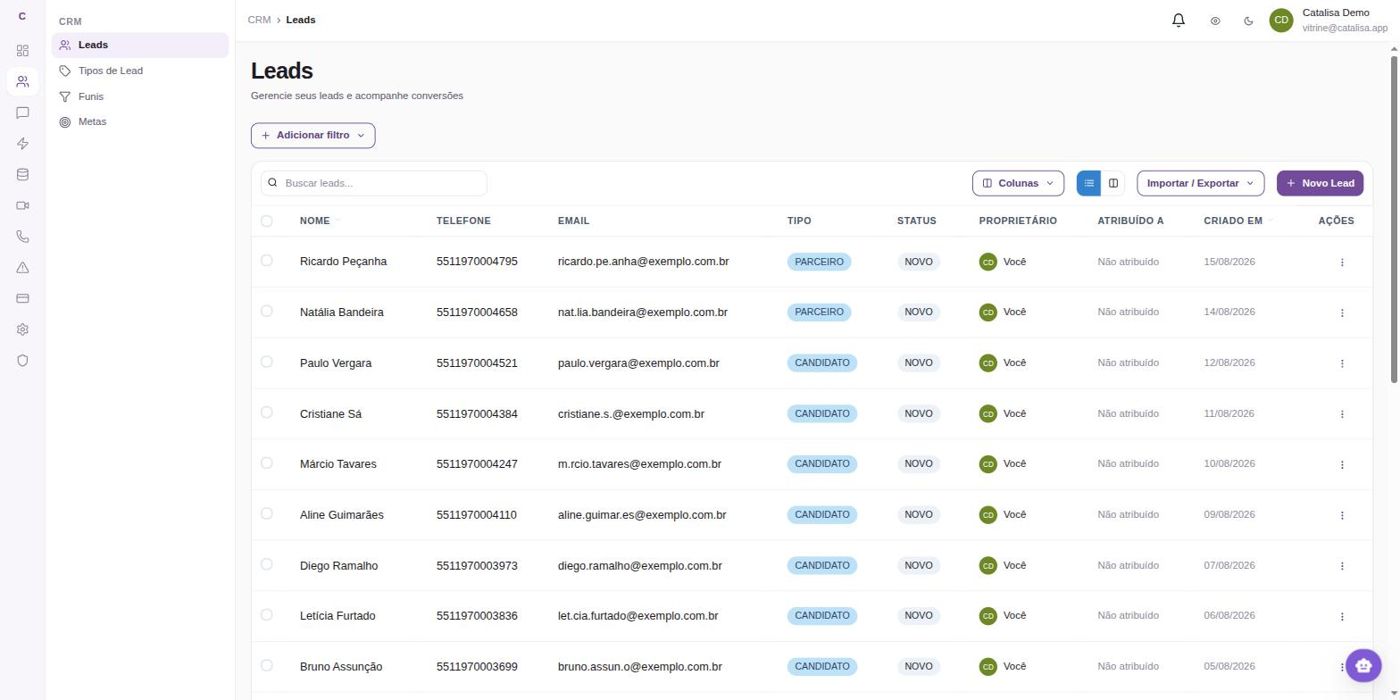
The candidate database, with type, status and owner.
The same process as cards, for the recruiter's day-to-day.
Path 1, in practice
These are the systems that come up most often at recruiting agencies, in Brazil and abroad. The list is here to make a single point: the design doesn't depend on which one you use — it depends on it having an API and on someone configuring the connection once.
Integration built and proven so far: Recruit CRM. The others are configuration work, with a timeline, and are not ready out of the box.
Both paths can coexist. Start by building here and connect the ATS later, or connect now and build here only what's missing.
Knowledge
You upload the documents you already have. The conversation starts answering from them — and says where the answer came from.
Audit trail
“Employees on a hybrid schedule receive a transit or fuel allowance, at the employee's choice, plus meal vouchers on days spent in the office.”
This is the passage that backed the answer about commuting, three messages earlier.
This piece works on its own. The knowledge base can answer on WhatsApp only, in interviews only, or both — and it serves other teams in the company with different content.
Dashboard
Recruiters don't need to open Catalisa to get their work done. But when they do, the whole process is right there.
Today at a glance
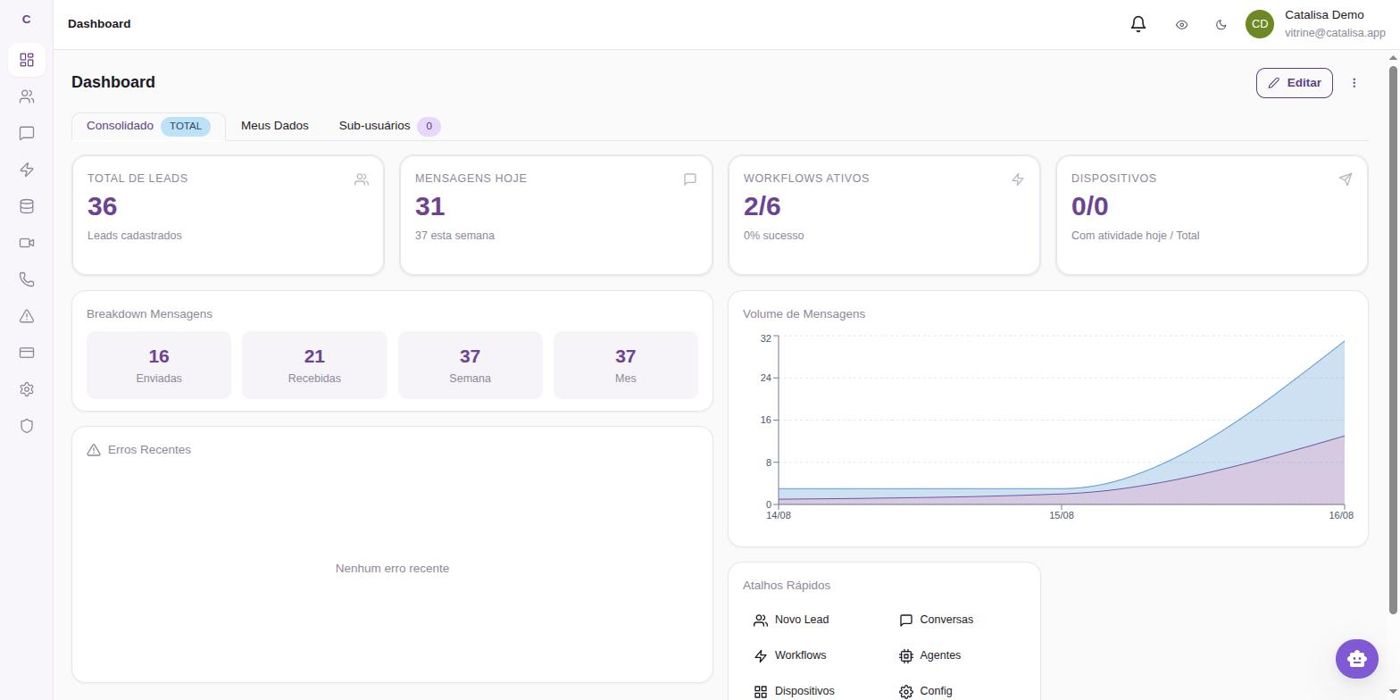
Daily volume, messages and workflow runs — and an alert when something fails.
A stage-by-stage pipeline, with counts and owners.
The process workflow, editable without code.
Who does the work
Each agent with its own role and its own tools.
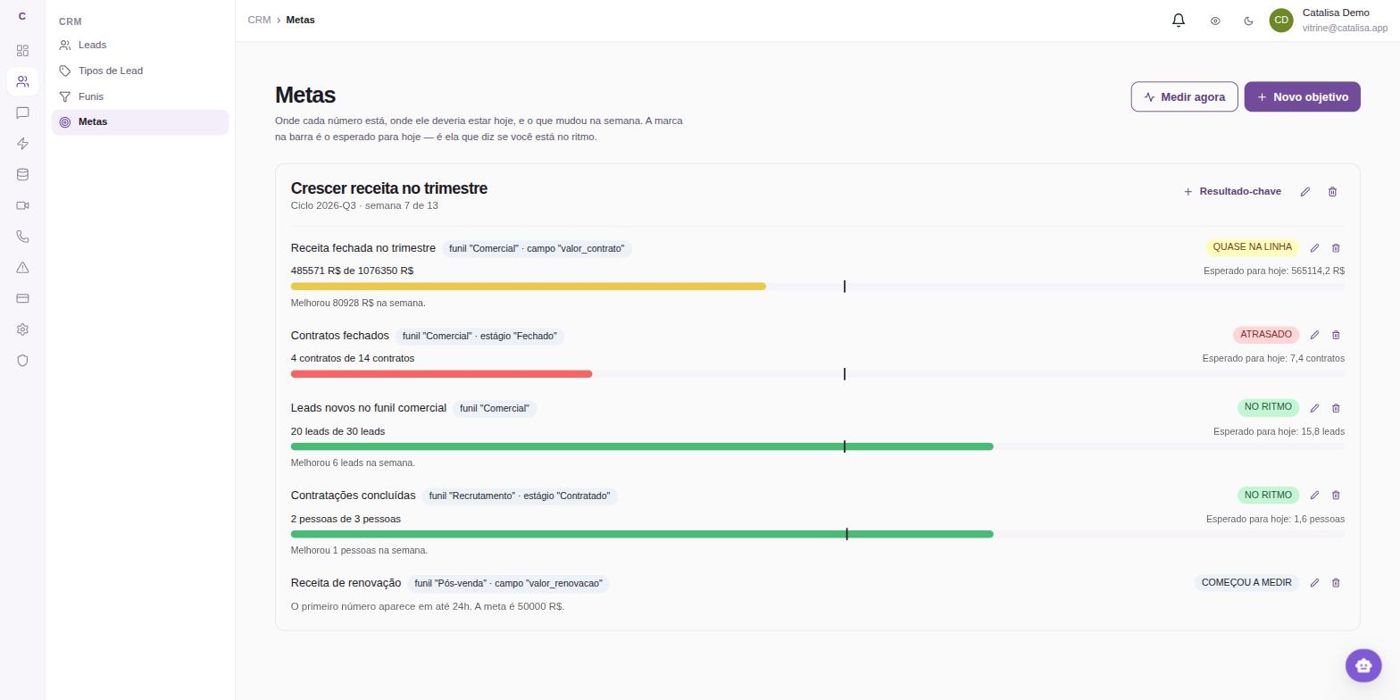
Team goals measured against what happens in the pipeline.

Security and trust
Recruiting deals with résumés, salaries and reasons for leaving a job. No jargon: what to say when your client's legal team asks.
The questions
They come up in every compliance meeting. Here they are, with answers you can repeat in front of your client.
01 — 05
On our own servers, not in some foreign cloud nobody can pin down. Résumés, interview transcripts and conversation history stay in your operation's database.
If your client's policy requires it, even the AI engine can run in-house.
No. Each client is a separate house with its own front door. The separation doesn't depend on someone remembering to configure it right — it's built into how the data is stored.
The same goes for knowledge bases: one client's policy never answers another client's question.
Nothing sensitive goes out without someone accountable. Interview assessments, stage changes and résumé deliveries start as drafts or logged actions — an evaluation only reaches the client after a recruiter has read it.
If the answer isn't in your policy or your system, the conversation says it will check instead of improvising.
It only does what's on the list you approved. That's not a promise of good behavior: anything off the list simply doesn't exist for it.
It's the same logic as giving an employee the key to one room, not to the whole building.
Everything is logged: which conversation moved the candidate to a new stage, when, and who approved the assessment that was sent.
If the client disputes a referral, you open the history instead of digging through someone's inbox.
Beyond the five
The platform went through an independent security audit, and what it flagged was fixed — including the hard parts.
Brazil's data protection law, handled: candidate data belongs to the candidate. Deletion on request, with no ticket and no week-long wait.
System keys and credentials are stored encrypted. Nobody on our team can read yours.
A database copy on a separate machine, every day. A server failure doesn't become a lost hiring process.
Candidates consent to recording before entering the room. Nothing is recorded behind anyone's back.
Your hiring content is never used to train models.
We don't claim it's 100% bulletproof — anyone who says that is selling, not explaining. We tell you what's true: the content stays on our servers, what the conversation can do is a short list you approve, and every decision that affects a candidate goes through a person.
Frequently asked questions
The questions that come up in every conversation with a recruiting agency — answered straight, including the uncomfortable ones.
Straight to the point
If yours isn't here, it's worth a thirty-minute call — faster than a proposal document.
Yes. The conversation looks up roles and candidates, moves stages, adds notes and attaches résumés inside your recruiting system, via API — nobody switches tools. The integration built and tested so far is with Recruit CRM; other ATSs come in through the same door, and each one is a configuration job with a timeline, not a button that comes switched on.
Then your ATS starts here: candidate types with custom fields, a stage-by-stage pipeline and conversation history, in the same place the conversations happen. No migration project to get started — and if an ATS ever comes along, you can connect it later.
The number needs to belong to the company and be dedicated to these conversations. If today it lives on someone's personal phone, the way forward is moving to an agency-owned number. Candidates still see a single number, with your brand name on it.
It handles the routine on its own: status, stage, benefits, scheduling. Anything that affects how someone is evaluated — an interview assessment, a referral to the client — starts as a draft and waits for a recruiter to approve it. And when the answer isn't in your policy or your system, the conversation says it will check and brings in a person.
Days, not months. The recruiting setup comes ready-made: the work is connecting the number, uploading your documents, connecting the ATS and tuning the copy to your voice. The only item that doesn't depend on us is Meta's approval of the first-message template — which is why the pilot starts with a single role while that runs.
No. You need someone who knows the process up close — who knows what to tell candidates and clients. Setup happens on screen, and the workflow is editable without code.
The conversation hands over to a recruiter, history included. A sensitive topic, a complaint or an explicit request ends the automation — there's no maze to get back to a human.
The design is the same for internships and leadership positions; what changes is the content — the questions, the policy and what the copilot watches for in the interview. In executive search, volume is lower and the value lies more in the interview and the assessment than in screening.
Under LGPD, Brazil's data protection law, candidates consent to recording before entering the room, and the transcript stays with the meeting. Deletion on request, no ticket needed. Your hiring content is never used to train models, and each client sees only what belongs to them.
It starts with a focused scope and a single role: switch on the piece that solves the problem and measure it on a real role before expanding. We don't do off-the-shelf price lists — an operation using only video interviews isn't the same as one using the full journey, and the proposal follows what you switch on.
How it starts
How your agency handles conversations today, where candidates drop off and what clients chase you for. No screen demo in this first call.
Together we choose what to switch on first — messaging, interviews or knowledge — and what to leave out on purpose.
Number, knowledge base, connection to your ATS and workflows with your copy and your policy. Measured in days, not months.
A real role, from start to finish, measuring what matters: time to first contact and how many candidates were still standing at the end.
Demo
The same assistant answers the candidate, the client company and the recruiter — each one getting only what's theirs. Pick a conversation and start typing. It's the real thing.
Before you start
The assistant will address you by name, just as the conversation would continue on your WhatsApp. Just once, for all three conversations.
Data Engineer with an interview booked at Nubis Pagamentos. Ask about her hiring process.
Hi! You're speaking as Gabriela. I can tell you where her hiring process stands and what comes next.
Nubis Pagamentos, 6 open roles. She only sees her own roles — the other 56 don't exist for her.
Hi! You're speaking as Patrícia, from Nubis. I can show you how the roles we opened for your team are progressing.
The agency's recruiter: sees all 62 roles and every pipeline. Compare the same question across all three.
Hi! I'm your assistant. I can walk you through what the conversation handles on its own, what gets logged and what remains your call.
Answers come from the policy and open roles of this demo agency. None of these conversations changes data in any system.